Video
Legal Marketing Association conference
Ad gurus Nancy Vonk and Janet Kestin of SWIM say that law firms need to take a chance in their marketing collateral and it is up to the legal marketing department to drive the bus.
Speaking at the Legal Marketing Association annual meeting in Toronto, the women, formerly of Ogilvy, gave kudos to Torys LLP mergers and acquisitions .
They says law firms are too focused on details, things like their rankings and deals, rather than trying to build a brand that tells the market what they do and how they are different from their competitors.
Blogs are too boring and web sites too similar. You can simply cut and paste one law firm name over another.
But some firms
The women say law firms need to be thought leaders and share knowledge and information. Tell your market about trends. Steal from packaged goods marketing and tell a story.
You need to put a “stake in the ground” and tell the public about your service. It’s not about the case you won. “Generic isn’t the way to go. Identity matters.” Differentiate yourself and tell a story.
Online Video as a Grassroots Campaigning Tool
With a federal election looming quickly in Canada on May 2, online video could one of the best ways to get an individual candidate’s messages across to the electorate. There are only a precious few days left now for door-to-door campaigning and limited access to the local media, however, online video offers a great way for candidates to connect on a personal level with hundreds or thousands of viewers, control the messaging and reach many more people than possible on walk-abouts. This tool also has a broader application in corporate and other spheres where constituents or audiences are diverse and far-flung.
Below is an example of a series of video clips we produced last week for one forward-thinking candidate in Toronto. Uploaded within hours onto his own “channel” on YouTube and Tweeted to followers, this series allows the candidate to speak heart-to-heart about why the constituency is special, why he feels a connection to their issues and what he can do differently.
Kevin’s channel can be seen here.
And, by the way, you can have a lot more fun with this medium (and perhaps attract some buzz) than you can with many other communications tools, as illustrated in this cheeky video for the same candidate.
The nice thing, by the way, about using YouTube as a distribution channel is that it is quick, platform independent (works on iPhones, for example, unlike Flash-based players used on most corporate Web sites), can be embedded anywhere (such as other Web sites, as seen on this page), and is free. If desired, you can also set privacy options so that only specified audiences can watch the video and block advertisements.
The same communications approach could be taken by CEOs and other leaders in regular “fireside chats” with employees, professionals updating clients on new developments in areas of interest, not-for-profits campaigning for funds, etc. By adding in free social media tools such as YouTube, iTunes, Twitter and others, you then have an easy and inexpensive way to distribute your messages without relying on traditional news media or expensive advertising.
A Right to Privacy at Seminars?
 So, let’s open a can of worms and ask the question: Is there a right of privacy for clients and others attending an event you are webcasting or videotaping? That is, can you include shots of the audience, broadcast their questions and capture their image (whether intentional or not) without seeking their express permission?
In my view, there is no right of privacy in this setting and permission is not expressly required. That said, there are some things you can and should do to ensure no one complains. Also, quite apart from the privacy rights issue, any video shot or broadcast and used for commercial purposes may indeed require some form of notice to attendees or even a release/consent form.
First, let’s talk about privacy rights in a seminar, workshop or other similar setting. I’ve had this discussion recently with a treasured client that wanted to ensure there would be no shots showing audience members (even the backs of heads) and no broadcast of the Q&A portion of the program. Why? The client believed there were “privacy rights” at stake. Well, no, there are not. Seminars, workshops and the like are public or invitational events, and there is no reasonable expectation of privacy in attending the event or asking questions in public. Yes, privacy legislation in Canada does control organizations collecting “personal information” and information that might specifically identify people, but there are exemptions for information that is publicly available. When you walk into a store and your image is captured on closed-circuit cameras, for example, you have no legal right to object to the collection of that information (though, Canada’s Privacy Commissioner doesn’t like CCTV cameras that capture passersby outside the store). While purely aesthetic reasons for keeping people’s heads bobbing in and out of shots are absolutely correct, there is no legal basis in my view for concern about privacy.
Next, though, let’s think about the fact that a webcast or video capture of an event is for commercial purposes. During my career as a journalist, I didn’t have to worry much about this since newsgathering is typically considered non-commercial and exempted from such restrictions. A corporate event, however, is commercial in nature (even though it’s often framed as an educational occasion). In this regard, there are some concerns that could be raised by clients or others attending who might object to the use of their image for a commercial purpose, such as post-event replays for other clients. It’s not unusual, for example, to see TV shows pixelate corporate logos on T-shirts or business signage to avoid claims for misappropriation of image.
Short of getting a written consent from every audience member captured on camera, there are some precautions organizations can take:
- Post a General Notice: Near the seminar entrance or on the sign-in table, post a notice stating prominently: “This event will be videotaped and/or webcast”.
- Announce Before Event Begins: Before the proceedings get underway or during the moderator’s introduction, tell audience members that the proceedings are being taped or broadcast, and to keep that in mind when asking questions or moving about the facility.
- Implied Consent Notice: Better yet, do as some seminar companies do and include a notice in the sign-up materials or Web page for the event. Here’s an example adapted from one seminar provider: “Videotaping Policy: During this event, ABC Company will be videotaping and broadcasting. Most likely, you will be filmed, recorded or photographed as part of the audience. By your attendance, you grant permission to be videotaped, audiotaped or photographed for commercial purposes and agree to the following: being recorded, filmed, videotaped, or photographed by any means; commercial or any other use of your likeness, voice and words without compensation; specifically waiving all rights of privacy during the videotaping, filming, recording or photographing and releasing ABC Company from liability for loss, damage, or compensation from the commercial or other use of your likeness, image, voice or word.“
- Raise the Cameras or Fix it in Post-Production: The solution we have hit on that works best is to raise the cameras to a height where the audience is not visible (about 7 ft. or so). There is still a small chance that someone will stand up or walk by a speaker (particularly speakers who remain seated at a table), but we are usually able to switch to a different camera for 10-15 seconds or edit it out later. The one downside to this approach is that you are restricted in the types of camera shots available. For example, with no wide shots of the audience, you can choose from only a few different shots of the speakers.
It’s a complex issue, but with some precautions, you can safely and effectively deliver your event through the Web and recorded video.
Online Political Rally Draws Massive “Virtual Crowd”
Canada’s Liberal Party scored a “first” recently with a live and interactive “Town Hall” webcast. The event, designed to unveil the Party’s platform, reportedly drew a crowd of over 9,300 unique viewers and elicited nearly 1,000 questions through Facebook, Twitter and the Party’s website. The Party believes online webcasts can reverse the trend toward declining voter turnout.
Couldn’t agree more. We saw the power of the Internet to rally voters in the 2008 U.S. presidential election and we will see it in Canada as more politicos recognize that most people would prefer to spend time sitting in front of their computer screens than answering the door bell and politely listening to campaigners ineffectively chat them up.
Webcasting can be a highly effective tool for political parties, as well as anyone else with key messages to communicate. It is amazingly cost-effective (imagine the costs and logistics of hosting a crowd of 9,000 in a public hall or hotel). You control the messaging and questions you choose to answer, you can track viewership, you likely get some press coverage, and the event can also be recorded for playback on-demand.
There are plenty of other options for politicos interested in leveraging video. Imagine launching a series of YouTube 4-5 minute clips with your candidate talking heart-to-heart about why the constituency is near and dear, why he or she feels a connection to their issues and what the Party can do differently. Or, imagine a candidate hosting a webcast interactive “fireside chat” regularly or throughout a campaign from the local constituency office, fielding online or emailed questions. After the event, it’s loaded onto YouTube.
Video and webcasting are not the be-all-to-end-all of communications methods, but they do offer a highly personal way to inexpensively engage thousands of people at once.
Women: What to Wear on TV/Video
Some do’s and don’ts…
- Hair: Soft and simple hairstyles are most flattering. Keep your hair out of your eyes.
- Clothing: Don’t wear white or very light-coloured dresses, suits or blouses. Blues, tans and shades of grey work best. Avoid small patterns and stripes, they appear too busy on the screen. Be careful wearing something new. You don’t know how it moves with your body and where it may pull.
- Jewellery: Avoid large and extremely bright pieces, they tend to flare and distort the picture. Large bracelets, rings and watchbands can hit the microphone or the desk, and create unwanted noise. If you usually do not wear jewellery, don’t wear it on television.
- Shoes: Generally, we shouldn’t see them but wear darker colours. White or light-coloured shoes can make your feet look larger on screen.
- Make-Up: Everyday street make-up is adequate for TV. If you normally don’t wear make-up, use a light powder to reduce shine from the lights. Carry some light face powder and blush with you in the event that no one is available on-set to help you. If you do your own make-up, keep it simple and natural. Don’t wear vivid red lipstick or lip gloss. Stick to softer tones.
Finally, recognize that most of what video and TV captures is from the waist up. So, focus on those areas.
Men: What to Wear on TV/Video
Some do’s and don’ts:
- Suits: Avoid suits with stripes, checks or small patterns. Medium-tone grey, blue, brown or mixed colours are best. If you wear a black or dark blue suit avoid light-coloured accessories. Don’t wear anything you wouldn’t wear at the office, no matter what the interviewer is wearing. If you feel silly, you’ll look silly and the audience will not take you or your message seriously.
- Shirts: Grey or light blue shirts work best. Off-white or pastel colours are also good. Pure white shirts may cause technical problems with the light balance of older cameras, so they should be avoided.
- Haircuts: Don’t get one right before your television appearance. Haircuts take a few days to settle in. If you trust your barber will not get carried away, get a light trim or razor cut.
- Neckties: Muted colours are preferable. Avoid checks or very small patterns (the patterns drive some video cams crazy). Bow ties have a tendency to move when you speak so, unless it makes you feel ill at ease or it’s your “brand,” wear a regular tie. Also, make sure your tie is snug up to your collar and not loosened.
- Microphone: Attach the lavalier microphone to your lapel, not to your tie.
- Socks: Wear longer over-the-calf length socks so that when you cross your legs there will be an unbroken line of colour from your pants to your socks. Nothing looks worse than bare legs except perhaps with white socks. Match the colour of your socks to your suits or pants.
- Shoes: We shouldn’t see them. Keep your feet on the floor and don’t fold your legs such that so your shoe bottoms show.
- Handkerchiefs: If you must wear a pocket-handkerchief, make sure it is fresh and unwrinkled. Avoid pure white breast pocket handkerchiefs. Muted colours or off-white are recommended. Fold neatly.
- Jewellery: Avoid large, flashy tie clasps, cuff links, chains, etc. because they flare and distort the picture.
- Make-Up: The best make-up for men is having a deep tan; if you don’t have one follow the advice of the make-up person. If one is not available to help you, just dust your face lightly with powder to reduce shine from the lights. A shiny face indicates a nervous speaker and will detract from your credibility.
- Glasses: Avoid heavy, dark frames. Your frames should not interfere with the audience’s view of your face. Never wear dark glasses for a speaking engagement; the audience will wonder what you are hiding or what’s wrong with your eyes. They’ll be so busy trying to figure out the problem that they’ll forget to listen to what you’re saying.
- Pockets: Empty your pockets of loose change to avoid the temptation of putting your hands in your pockets and jangling the change.
- BlackBerry and Phones: Leave your BB and other devices somewhere off to the side. The BB will make a buzzing sound that electronically interferes with audio equipment and other phones will make a distracting noise even if set to vibrate.
And, finally, a nice little tip from the 1987 comedic movie Broadcast News… sit gently on the back of your suit jacket and it will help pull your suit shoulder tight across the top, giving you a nice crisp straight line.
Video Duration: Does It Matter?
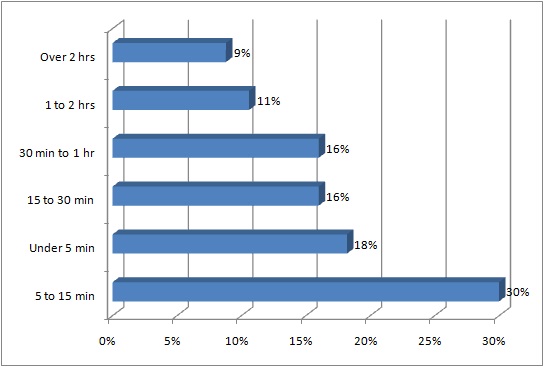
Typical Video/Streaming Duration
This is perhaps the most hotly debated and frequently asked question for online video producers. How long should the video be?
Most people, based on their personal experiences with varying video quality on the Web, think it should be as short as possible. I’ve heard opinions ranging from “under one minute” to “5-6 minutes” to “absolutely no more than 10 minutes.”
Surprisingly perhaps, some research (see the chart here from a recent Aberdeen study) suggests the typical viewer is actually quite tolerant, with the largest group (30%) comfortable viewing in the 5 to 15 minutes range.
This doesn’t mean, however, your videos should be that long. As always, the correct duration or length will be determined by the strength of your content and the viewers’ interest in it.
In many respects, this is like the age-old debate over whether advertising copy should be short or long. Direct marketing guru Bob Stone and others proved a long time ago that, paradoxically, lengthy ad copy could hold a reader’s interest as well or better than short copy if it was well written. Tom Reid, a mentor of mine in days’ past, used to tell folks who argued for short copy that he could write a 300-page book they wouldn’t be able to put down… their own life story, he would add.
All that said, tell your story in as little time as possible. Be brutal in editing it down and keep the messaging simple (remember the old reporter’s adage: “I would have written a shorter story if I had more time.”). For most videos, in my view, 5 to 10 minutes sounds about right.
Teleprompter or No Teleprompter?
The teleprompter (originated by the TelePrompTer company in the 1950s) is an indispensable component in modern-day television and video production, providing onscreen talent with a scrolling screen of words to speak. It saves many a babbler and stumbler from professional embarrassment. The question we often run across when doing Q&A-style interviews or video clips is, “do we need one”?
Yes, you do. Even when an interview-subject knows the topic cold or has handwritten notes in his or her lap, it can never come across as smooth and professional as it does with the teleprompter. First-timers, with a little bit of practice, get the hang of it easily and it’s fun to use. Now, there are a very rare few who can speak contemporaneously or off-the-cuff, and make it sound authoritative. Then, there is the other 99.9% of the population. So, use ’em if you’ve got ’em.
Another related issue is where to place the teleprompter… to the side of the camera or in front (using a “two-way” mirror)? In my opinion, particularly for Q&A video clips and most corporate-style videos, you want the teleprompter to the side. Watch any news program and you’ll see the interview-subject speaking to the reporter off-side. It’s more pleasing for the audience and easier for the interviewee.
But “no,” you say, “I want to look at my audience and give them the straight-goods. Look ’em in the eye just like a real conversation.” Forget it. Most interview-subjects have a tough time looking natural when staring into a camera. Their eyes dart side-to-side as they read the teleprompter. Or, they can’t bring themselves to blink. Very scary for viewers and often looks unnatural.
The one possible exception is when you are doing the equivalent of a reporter’s or presenter’s monologue (a “stand-up” as it’s called). Those occasions, however, are rare in most corporate videos.
So relax, enjoy the benefits of the teleprompter and enhance your reputation as an all-knowing and confident expert.
Online Video Streaming Soaring
Nielsen Media Research, the audience measuring service, reports that video streaming on the Internet is ramping up seriously. As of January 2011, year-over-year, video streaming itself is up 31.5% over 2010. That’s 14.5 billion video streaming sessions. Nielsen says even though the number of “unique video viewers” only rose 3.1% (i.e., a modest rise in the online population viewing), those same viewers streamed 28% more video than in the previous year. They also spent an average of 45% more time watching online video. Obviously, people are growing more comfortable with online video as a communications vehicle.
And, what types of videos? Not surprisingly, movies and music videos are among the most popular subject-matter. YouTube, with its mix of wacky and legitimate video clips, is the undisputed king of content delivery networks, with 8.5 billion video streams delivered, or 10 times that of its nearest competitor, Hulu.
Script or No Script?
Quite often, subject-matter experts (clients) interested in doing one or a series of audio or video clips think to themselves: “Why do I need a script? I know this topic inside-out.”
OK, ummm…. you need a script. Sure, if you only want to blurt out a few ad libbed lines of little consequence, you can go without a script. The vast majority of us, though, need to think about what we want to say, and how to best get it across quickly and effectively. During those times when there has been no script or only a few lines of scrawled notes, I have sat through some unbearable periods of silence and muted apologies as the interviewee ponders what to say. Sure, we can fix most of it in “post” (editing), but it never looks or sounds as good as a polished presentation (i.e., written and re-written).
That’s why I typically offer to help work on the script with clients well before we record. It saves everyone a lot of time and headache.
And, while we are on the topic… As a viewer of others’ work, I have sat through some unbearable videos that clearly had little or no scripting. Sadly, the interviewer is often seen searching mentally for his or her next question, the interviewee struggles to say something clever quickly, and the interview usually goes on too long. Ugh.
So, always try to create some form of script.